Redesign, Relaunch or CRO First? How to Make the Right Call
CRO, redesign or relaunch: which path fits your Shopify store, the three questions that decide it, and how to do any of them without losing rankings.

Jason Spizert
Published on
6 min read

The short answer
Conversion optimization first if the store fits your brand and only specific spots are costing you buyers. A redesign if the design and buying journey no longer fit your brand but the tech holds up. A relaunch if the theme, apps or platform are holding back growth. Three questions decide it: are the numbers right, does the store look like your brand, and can the tech keep up?
What's the difference between conversion optimization, a redesign and a relaunch?
All three are meant to sell more, but they work on different levels. Conversion optimization changes specific spots in your existing store. A redesign renews the design and buying journey on your existing platform. A relaunch also rebuilds structure, tech and, if needed, the platform.
| Path | What changes | What stays | Biggest risk | Fits when |
|---|---|---|---|---|
| Conversion optimization | Specific pages and components: product page, cart, offer | Design, theme, URLs, tech | Optimizing for the wrong number when tracking is off | the store fits the brand and the numbers show clear breaking points |
| Redesign | Design, product pages, mobile buying journey, cleaned-up apps | Platform, usually also URLs and data | New design without baselines, and afterwards nobody knows whether it's better | the store looks cheaper than your product |
| Relaunch | Also structure, theme foundation, apps, integrations, possibly the platform | Products, customers, orders, rankings (with clean redirects) | URLs change without redirects, tracking drops out at switchover | the tech is holding back growth |
Three questions that drive the decision
Before anyone talks about design, three answers need to be on the table. They almost always decide which path fits.
- Are the numbers right? If Shopify, GA4 and your ad accounts differ wildly, every decision is a guess. Fix measurement first, then decide. Why dashboards drift apart is covered in Shopify, GA4 and Meta show different numbers.
- Does the store look like your brand? If it looks like a template while your product, packaging and price are premium, it loses buyers at the first impression. Testing individual buttons won't fix that; a redesign will.
- Can the tech keep up? Blocked theme updates, a pile of apps slowing each other down, or missing features for new markets and wholesale buyers are reasons for a relaunch. A new design on that foundation won't last long.
If the numbers are clean, the brand is coherent and the tech is solid, the smallest path remains: targeted conversion optimization.
How can you tell that optimizing is enough?
Optimizing is enough if …
- the store fits the brand and visitors describe it that way too
- the numbers show a clear breaking point, for example from cart to checkout
- theme and apps can be changed without workarounds
- there are enough orders to measure changes
Optimizing isn't enough if …
- every change needs a developer because the code has grown out of control
- the store looks noticeably cheaper than your product
- the platform can't do something you need
- tracking is so messy that nobody knows where buyers drop off
You can find out exactly where buyers drop off with the diagnostic order in Shopify traffic but no sales. For an outside view, book the free call below.
When a redesign is the right step
When the store sells, but doesn't look as high-quality as what it sells. Then the bottleneck is the first impression and the product page, not a single button.
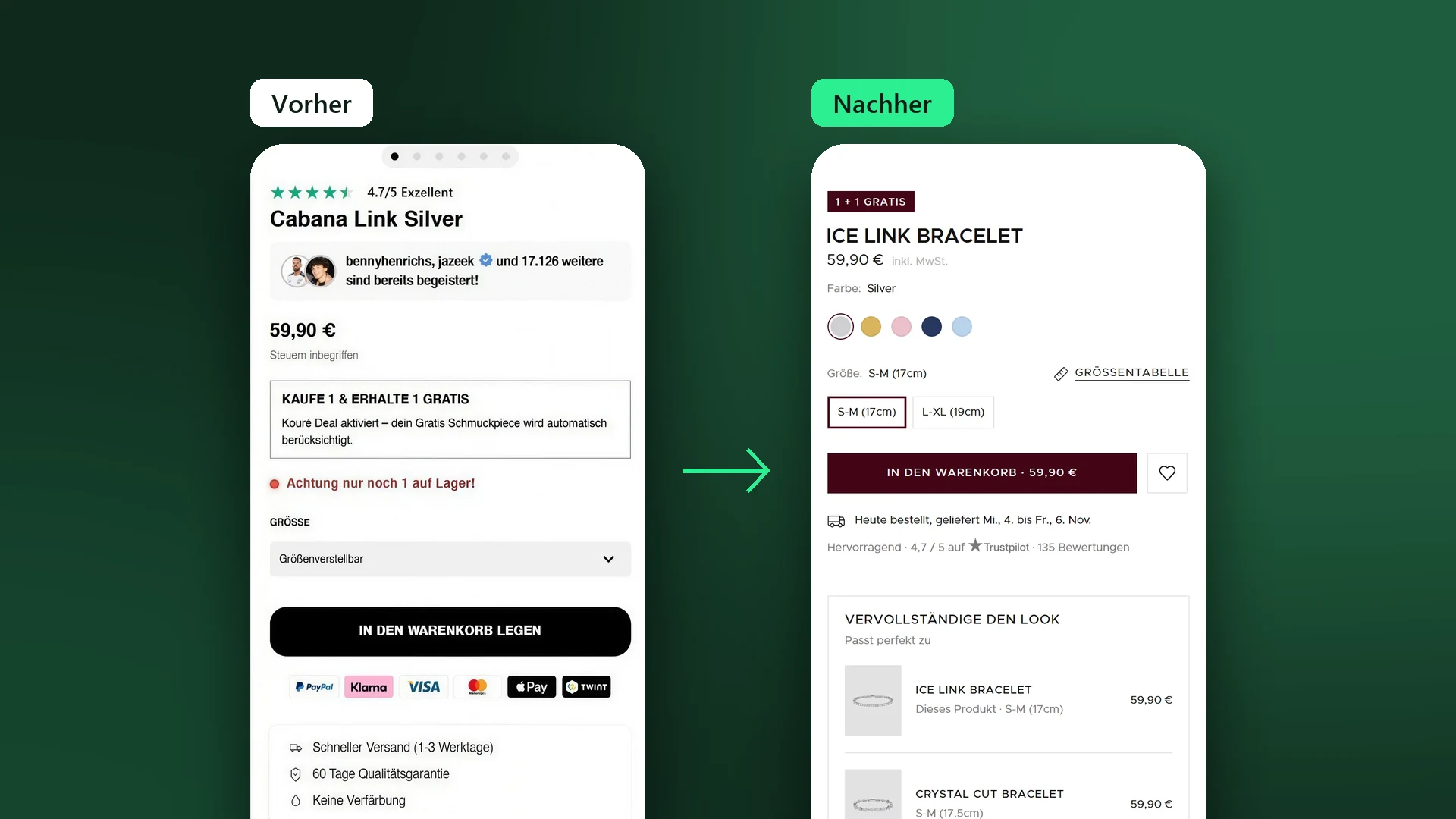
At Koluré, the platform stayed and the page structure was new: benefits as a clear list, a calmer offer, shipping and guarantee as their own components instead of running text. Whether an affordable theme or a custom design is the better path is compared in Shopify theme vs. custom design.
When it has to be a relaunch
When the tech has become the brake. Typical signs:
- Theme updates can't be installed because code customizations block them.
- Apps pile up, the store gets slower, and nobody knows which app does what anymore.
- New countries, wholesale pricing or an inventory system can't be connected cleanly.
- The platform itself no longer fits, for example when switching from WooCommerce or Shopware to Shopify.
How a relaunch on Shopify works without taking your store offline is covered on our Shopify redesign page. For a platform switch, the checklist in How to migrate your store without losing rankings helps.
The four most expensive mistakes
- Rebuilding without baselines. If you don't record revenue per visitor, conversion rate and order value by device and channel beforehand, you can't tell afterwards whether the new store is better.
- Changing URLs without redirects. Google recommends permanent redirects from every old address to the matching new one, without chains across several hops. In Shopify, you set them up under URL redirects.
- Switching everything at once. Large stores can move section by section, which is also what Google advises for large websites. For a redesign, that means: the pages with the most revenue first, then the rest.
- Switching during your own peak season. A few days before Black Friday or a drop is the worst time. Switch when a setback won't cost you half a quarter.
Redesign, relaunch or optimize
Measure first, then decide. The most expensive relaunch is the one nobody needed.
How to keep each of the three paths safe
Shopify makes it easy to be careful. You can duplicate the theme, and Shopify itself recommends a backup copy before every customization. The copy is rebuilt and checked in preview while the store keeps selling with the old theme. Up to 20 themes fit in the admin, so the old one stays there as a fallback.
After that, the same order applies whichever path you take: record baselines, build in parallel, check test orders and tracking, switch over, compare a period of the same length. And once the store is up, the real work begins: making it better month after month. What that looks like as ongoing support is on its own page.
The question isn't whether your store needs to be new. The question is which level is holding it back right now.
Frequently asked questions
A redesign if the tech holds up and mainly the design and buying journey no longer fit the brand. A relaunch if the theme, apps or platform are holding back growth, for example because updates are blocked, features are missing or new markets and B2B can't be handled.
When the store fits the brand and the numbers show specific breaking points: a product page that leaves a question open, shipping costs that only appear at checkout, or a weak mobile view. Then targeted changes bring more than a rebuild.
Not a testing program yet, because there aren't enough orders to measure against. What makes sense: clean tracking, product pages built on buying psychology and collected customer feedback. Testing starts once there are enough orders.
Not if every old address permanently redirects to the matching new one. Google recommends 301 or 308 redirects without chains for this and states that such redirects don't cost PageRank. Large stores can move section by section.
A Shopify redesign with us typically takes 2 to 3 weeks from kickoff, once the content is ready. A relaunch with a platform switch, data migration and new integrations takes longer; the schedule is only set after the initial audit.
Yes. In Shopify, you can duplicate the theme and rebuild the copy while the store keeps selling with the old theme. With enough traffic, the new product page can first run in an A/B test against the old one.